
This article contains affiliate links. We may earn a commission if you buy through them.
For many creators, the real question isn’t whether a new mic will sound better; it’s whether it will simplify your desk, your camera angles, and your software routing at the same time. Hybrid Maono microphones aim to reduce cables while preserving dynamic‑mic control, so you can plug in over USB today and switch to wireless or XLR when your shoot demands it.
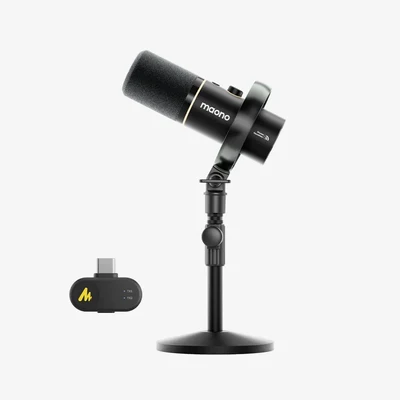
If you want one mic that can shift with your setup, start by looking at the PD200W Hybrid Podcasting Microphone and the other current Maono options below. This guide focuses on Maono microphones that combine wireless, USB and (on select models) XLR paths, and how Maono’s software fits in.
Why hybrid microphones matter for creators
Hybrid connectivity simplifies gear because it lets one device adapt to different shoots. The PD200W Hybrid Podcasting Microphone is built around three connection modes—wireless, USB and XLR—so you can go cable‑light for live streaming, plug in via USB for a quick desktop session, or drop into an XLR chain when you need your interface and analog processing. That choice matters if you alternate between a standing desk, a mobile shoot, and a two‑host podcast at a table.
Because it’s a dynamic cardioid mic with onboard three‑level noise reduction, PD200W is tuned for close speech in everyday rooms. Dynamic mics suit untreated rooms: Maono’s own FAQ explains that dynamic microphones capture less ambient noise than condensers, which helps when you don’t have acoustic treatment and still want a focused voice track.
Wireless, meanwhile, offers real flexibility—Maono specifies up to 60 meters line‑of‑sight range and a long battery life (they cite up to 60 hours with RGB lighting off). Those figures are from Maono’s lab tests and depend on settings and environment, so treat them as guidelines rather than fixed results. If your shoot needs a fixed chain and stable power instead, XLR into a mixer or interface remains the most predictable path; USB is the fastest way to go live from a computer without extra boxes.
What changes for your decision: if you want to eliminate a boom arm cable for video framing or a shared desk, the PD200W’s wireless mode helps tidy the set. If you’re primarily stationary and mix in software or with an interface, a USB or XLR connection will give consistent gain staging without battery management. You can visit Maono to look for the PD200W product page and confirm the connection paths and included accessories.
Control with Maono Link, skip extra boxes
Hardware flexibility is only part of the story. Maono’s desktop software, Maono Link, layers on gain, EQ, noise reduction, lighting presets and firmware updates for supported USB microphones, including PD200W and PD100W. That means you can tune a voice preset for your room or switch RGB lighting without adding an external processor or control surface.
Check OS support first. Maono lists system requirements for each app: Maono Link runs on Windows 10 version 1809 or later and macOS 13.5 or later. Other tools—Arena, ProStudio and ProStudio 2, and DGM20 Tools—are Windows‑only, and Maono says Linux isn’t supported by any of these applications. If advanced routing is central to your stream and you’re on macOS, confirm which features you truly need and whether Maono Link alone covers them.
Plug-and-play still works. Maono states their microphones function as standard plug‑and‑play devices without software; Maono Link simply adds optional tuning and updates. That’s useful if you use a managed workstation or a borrowed production laptop where installing software isn’t possible. You can always add Maono Link later to supported mics when you want to save or recall EQ and NR settings.
If you’re ready to check supported devices and downloads, head to Maono and look for the software download center and Maono Link information.
Worked example: a two‑host, cable‑light podcast
Imagine you’re producing a two‑host show at a small round table this week and then switching to a solo desk stream next week. With PD200W, you’d confirm whether the kit you’re buying supports a 2TX+1RX wireless setup for two microphones and one receiver. Maono’s page calls out 2TX+1RX support, but Confirm kit contents for 2TX+1RX because bundles vary; you’ll want to check exactly how many transmitters and receivers are included.
At the table, you’d run both hosts wirelessly so you can clear cables from the middle and frame a wide camera shot without stands in the way. Maono claims up to 60 m line‑of‑sight range, but venues differ, so Plan around real‑world range by keeping the receiver within a short, unobstructed path and having a quick USB fallback if interference appears. Battery life is stated as up to 60 hours with RGB off; if you forget to charge, switch off lighting to extend runtime.
Back at the desk, the same PD200W Hybrid Podcasting Microphone can move to USB for a short streaming session or to XLR if you prefer outboard processing and a hardware fader. In USB mode, you can open Maono Link to apply light EQ and noise reduction; in XLR mode, you’ll set gain on your interface and keep software out of the path.
If that flexibility fits your calendar, visit Maono and look for the PD200W kit configurations to see which transmitters, receivers, and mounts are included for co‑hosted use.
USB/XLR desk mics versus wireless setups
There are days when reducing cables matters most, and days when stability and predictable power win. Desk rigs favor USB/XLR stability because you’re not managing a link or battery, and you can set consistent gain once and leave it. Maono’s PD400X is a dynamic microphone for podcasters with both USB and XLR connections—use USB for a simple, driverless path or XLR when you want to run into a mixer or interface.
When framing and movement are part of your story, Wireless frees camera framing. The PD200W Hybrid Podcasting Microphone lets you clear the desk and step back from the boom without changing microphones. Creator impressions hosted on Maono note a clear, full voice and effective noise‑reduction presets. Treat those as context rather than a promise; the practical gain is that you can choose wired or wireless per shoot.
A balanced approach is to pick one primary mode and keep a fallback. If your main routine is a fixed desk show, run USB or XLR and keep a charged wireless receiver nearby for occasional standing segments. If you’re mostly mobile, plan to charge between segments and keep a short USB‑C cable in your bag so you can switch the same mic to USB on a laptop when needed.
Which Maono microphones fit your workflow?
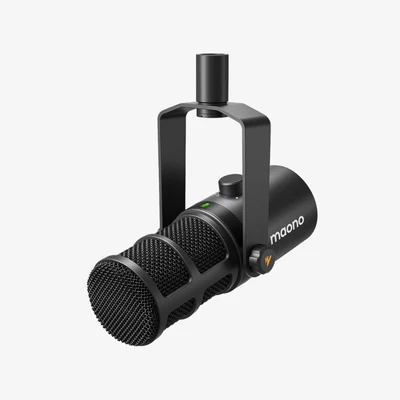
Match mic type to environment and let connection options narrow your pick. Dynamic cardioids such as PD200W and PD100W focus on your voice and help reject room spill; a wireless lavalier like Maono T5 trades isolation for discreet placement and maximum mobility. Connectivity drives workflow, so scan the differences below.
| Model | Type & pattern | Connections | Claimed wireless range | Claimed battery life | Sample format | Notable features / uses |
|---|---|---|---|---|---|---|
| PD200W Hybrid Podcasting Microphone | Dynamic, cardioid | Wireless, USB, XLR | Up to 60 m (line‑of‑sight, Maono lab) | Up to 60 h (RGB off, Maono lab) | 24‑bit/48 kHz | Three‑level noise reduction; co‑host friendly; advertises 2TX+1RX support |
| PD100W Wireless & USB Dynamic Microphone | Dynamic, cardioid | 2.4 GHz wireless, USB | Up to 50 m (line‑of‑sight, Maono lab) | Up to 40 h (RGB off, Maono lab) | — not stated | Noise reduction; Maono Link control for EQ/NR/RGB; desk or cable‑light use |
| Maono T5 Wireless Microphone | Wireless lavalier, omni | Wireless to phones/cameras | Up to 1000 ft (Maono spec) | ≈9 h per TX; up to 30 h with case | 24‑bit/48 kHz | Button & app ENC levels; mono/stereo modes; hands‑free placement for video |
If you primarily record at a desk and want the option to go cable‑light for occasional segments, PD200W and PD100W cover that spectrum with different ranges and runtimes. If you need maximum movement on camera and low‑profile placement, the T5’s lavalier form and long‑range spec are designed for that scenario. Range and battery figures are based on Maono’s lab tests and can vary with settings and environment.
Noise reduction and sound shaping: when to use what
Noise control and EQ are tools—not magic. PD200W includes a three‑level noise reduction switch so you can tame keyboard clatter or room hum without opening software. In USB mode on supported operating systems, Maono Link adds gain, EQ, noise reduction and lighting control so you can save a profile for your room and voice.
For clip‑on workflows, the Maono T5 Wireless Microphone uses an ENC algorithm with button‑controlled levels and deeper adjustment in the app, plus mono/stereo recording to separate tracks for post. Use light NR for natural tone if you want to preserve ambience; aggressive settings can reduce noise but may leave artifacts, which are harder to mask than a little room sound.
Remember, Software is optional. Maono says their microphones are plug‑and‑play; Maono Link and other utilities are there if you need them. If you’re on Linux, plan to run your mic without Maono’s apps and do any processing in your DAW or streaming software.
Before you buy: quick checks and a useful next step
- Verify software support: If you need Maono Link features, check your OS version (Windows 10 1809+ or macOS 13.5+). Arena, ProStudio/ProStudio 2, and DGM20 Tools are Windows‑only; Linux isn’t supported for these apps.
- Confirm what’s in the box: For co‑hosted wireless, check whether your chosen PD200W kit includes the 2TX+1RX configuration you need.
- Plan for real‑world battery: Maono’s battery and range figures come from lab tests and depend on settings like RGB lighting and line‑of‑sight. If a shoot is long, charge between segments and pack a USB cable as a fallback.
- Match mic type to space: Dynamic cardioids (PD200W/PD100W) help reject room noise for close speech; a lavalier (T5) is for hands‑free mobility and wide shots.
- Need help? Maono lists email support and a help center from the software page.
When you’re ready, visit Maono to look for the PD200W, PD100W, and T5 product pages and the software download center. Bring your OS version (Maono Link needs Windows 10 version 1809 or later, or macOS 13.5 or later) and your preferred connection path—wireless, USB, or XLR—and proceed if the specs align with your space and schedule.
